Crafting professional emails can be a challenge, but AI tools are here to help. This guide provides a comprehensive overview of email structure, tone, and AI-powered enhancements. We’ll cover essential elements from subject lines to signatures, enabling you to communicate effectively and professionally in any context.
From formal correspondence to urgent requests, mastering email etiquette is crucial. This resource equips you with the knowledge and strategies needed to create impactful emails that achieve your goals. We’ll also explore common mistakes to avoid, providing you with a practical and comprehensive approach to email writing.
Email Structure & Tone
Crafting professional emails is crucial for maintaining a positive image and achieving desired outcomes in the workplace. A well-structured email, paired with the appropriate tone, ensures clarity, professionalism, and fosters effective communication. This section delves into the essential elements of a professional email and the nuances of various tones.Effective communication hinges on a thoughtful approach. This involves considering not only the content but also the overall impression conveyed through the email’s structure and tone.
Understanding the subtleties of different tones allows for tailored communication, resulting in a more impactful message.
Essential Elements of a Professional Email
A professional email should include key elements for clarity and efficiency. These elements are fundamental to building trust and rapport. These elements ensure the recipient understands the message and can act on it effectively.
- Clear Subject Line: A concise and informative subject line immediately communicates the email’s purpose, allowing the recipient to prioritize it effectively.
- Formal Salutation: Addressing the recipient formally (e.g., “Dear Mr./Ms. [Last Name]”) is crucial for maintaining professionalism.
- Concise Body: Clearly state the purpose of the email and provide necessary information in a concise manner. Avoid unnecessary jargon or overly complex language.
- Specific Call to Action (if applicable): If the email requires a response or action, clearly state what the recipient should do.
- Professional Closing: Use a formal closing like “Sincerely” or “Regards,” followed by your name and title.
- Proofreading: Thorough proofreading is vital to eliminate errors and ensure a polished and professional appearance.
Different Email Tones
Emails should adapt to the context and recipient. A formal tone is appropriate for official communications, while an informal tone might suit internal team discussions.
- Formal Tone: This tone is characterized by a respectful and objective approach. It’s suitable for official communications, proposals, and formal requests.
- Informal Tone: This tone is appropriate for internal team communication, casual updates, and quick messages. Maintain a friendly and approachable style, but avoid slang or overly casual language.
- Urgent Tone: This tone is used for critical situations requiring immediate attention. The subject line should clearly indicate urgency, and the body should be concise and to the point.
Adapting Tone Based on Recipient and Purpose
Tailoring the email tone to the recipient and the purpose of the email is critical for effective communication. Consider the recipient’s role and the nature of your relationship with them when selecting a tone.
- Consider the Recipient: Understanding the recipient’s role, position, and familiarity with you will influence the tone.
- Define the Purpose: The objective of the email (e.g., requesting information, providing updates, making a proposal) will dictate the appropriate tone.
Email Tone Examples
This table demonstrates various email tones and corresponding subject lines.
| Email Tone | Subject Line Examples |
|---|---|
| Formal | “Proposal for Project X,” “Request for Information,” “Meeting Schedule Confirmation” |
| Informal | “Quick update on project progress,” “Team meeting next week,” “Questions about XYZ” |
| Urgent | “Critical Issue: Project Deadline,” “Urgent: System Downtime,” “Immediate Action Required” |
Subject Lines & Salutations
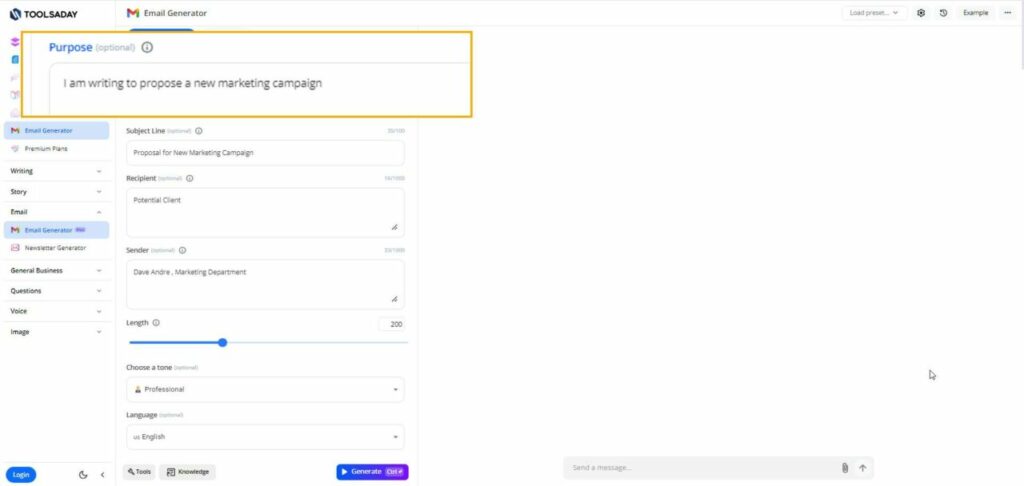
Crafting professional emails requires careful attention to detail, from the subject line to the closing. A well-structured email with a compelling subject line and appropriate salutation significantly impacts recipient engagement and the overall effectiveness of your message. This section focuses on the crucial elements of subject lines and salutations to ensure your emails are professional and impactful.
Effective Subject Lines
Subject lines are the first impression of your email. They determine whether the recipient opens the email or relegates it to the spam folder. Crafting a concise, informative, and engaging subject line is essential for maximizing open rates.
- Follow-up emails: Use subject lines that clearly indicate the purpose of the follow-up, for example, “Following up on [project name] proposal,” or “Checking in on [project name] progress.”
- Request emails: Be direct and informative in the subject line. Examples include, “Request for information on [topic],” or “Requesting a meeting to discuss [topic].”
- Update emails: Clearly convey the nature of the update. “Project [name] Update – Q3 Results,” or “Status Update: [Project Name],” are good examples.
- General emails: Use subject lines that provide context while remaining concise. “Meeting Request: [Project Name],” or “Feedback on [Project Name],” are effective options.
Compelling Subject Lines
Compelling subject lines go beyond simple clarity. They pique the recipient’s interest and create a sense of urgency or importance. They should accurately reflect the email’s content and avoid vague or misleading language.
- Specificity is key: Instead of a generic “Project Update,” use a more specific subject line like “Project Alpha – Q3 Progress Report.” This informs the recipient immediately about the content.
- s matter: Relevant s can improve searchability and visibility. Incorporating important terms, like “deadline,” “meeting,” or “proposal,” can make your email stand out.
- Conciseness is crucial: Keep subject lines brief and to the point. Aim for a subject line that’s easily scanned and understood. Avoid lengthy or overly complex sentences.
Appropriate Salutations
A proper salutation sets the tone for your email and establishes professionalism. The choice of salutation should reflect the level of formality and your relationship with the recipient.
| Relationship/Setting | Appropriate Salutation | Example |
|---|---|---|
| Formal, unknown recipient | Mr./Ms./Mx. [Last Name] | Mr. Smith |
| Formal, known recipient | Dear [Mr./Ms./Mx. Last Name] | Dear Mr. Smith |
| Semi-formal, known recipient | Dear [First Name] [Last Name] | Dear John Smith |
| Informal, close professional relationship | Dear [First Name] | Dear John |
Addressing Recipients
Addressing recipients by name, title, or a combination of both is important. Consider the level of formality and your relationship with the recipient.
- Using names: Using a recipient’s name creates a more personal touch. It shows you’ve taken the time to personalize the email.
- Using titles: Using titles (e.g., Dr., Mr., Ms., or other professional titles) is essential for maintaining formality. This demonstrates respect for the recipient’s position and role.
- Combining names and titles: A combination of both, such as “Dear Dr. Smith,” balances formality and personalization. This is often a safe approach in professional contexts.
Body Content & Formatting

Crafting professional emails involves more than just choosing the right words; it’s about structuring information effectively for maximum impact. A well-organized email body ensures the recipient easily understands your message and acts upon it. This section details strategies for logically arranging information, structuring paragraphs, and leveraging formatting elements for enhanced readability.Clear and concise communication is key in professional emails.
A well-structured email body fosters understanding and ensures your message is not lost in a sea of words.
Logical Organization of Information
The structure of your email body should mirror the logic of your message. Begin with a clear introduction, then present supporting points in a logical order. This order can be chronological, problem-solution, or a combination of approaches, depending on the context. Prioritize presenting the most important information upfront and use subsequent paragraphs to elaborate.
Paragraph Structure for Clarity and Conciseness
Each paragraph should focus on a single idea. This helps maintain a clear flow of thought and prevents the recipient from getting lost in a dense, convoluted message. Short, impactful paragraphs are generally preferred over long, rambling ones. Use concise language and avoid unnecessary jargon.
Using Formatting Elements for Readability
Formatting tools can significantly enhance the readability of your email. Using bullet points, numbered lists, and tables helps organize information visually and makes it easier for the recipient to scan and absorb key points.
Bullet Points for Listing Key Points
Bullet points are ideal for presenting a series of independent items, like key features, benefits, or action steps. This format allows the reader to quickly grasp the key information. Each bullet point should be concise and self-.
- Key Feature 1: A succinct description of the first key feature.
- Key Feature 2: A clear description of the second key feature.
- Key Feature 3: A detailed explanation of the third key feature.
Numbered Lists for Sequential Steps
Numbered lists are useful for outlining a series of steps, procedures, or instructions. They provide a clear, step-by-step guide for the recipient to follow.
- Step 1: Detailed explanation of the first step.
- Step 2: Elaboration on the second step.
- Step 3: Description of the final step in the process.
Tables for Presenting Data
Tables are best suited for presenting structured data, like comparisons, statistics, or timelines. Tables organize data in rows and columns, making it easy to compare and analyze information.
| Category | Description | Value |
|---|---|---|
| Category A | Description of Category A | Value for Category A |
| Category B | Description of Category B | Value for Category B |
Crafting an Email with a Strong Opening, Clear Points, and a Well-Defined Closing
A strong email opening immediately grabs the recipient’s attention and clearly states the purpose of the email. Follow this with a concise summary of the key points. Conclude with a clear call to action and a professional closing.
“A clear opening immediately establishes the context, supporting points are presented logically, and a concise closing reiterates the key takeaway.”
Handling Different Email Types
Effective professional communication often hinges on understanding and tailoring emails to specific purposes. This section explores various email types, highlighting key differences in structure and tone, and providing examples for clear and impactful communication. A well-structured email, tailored to the context, demonstrates professionalism and enhances the likelihood of achieving desired outcomes.
Meeting Requests
Meeting requests should be clear, concise, and provide all necessary details for the recipient to readily understand the meeting’s purpose and agenda. This ensures a smooth scheduling process and productive meetings.
- Subject Line Clarity: Use a subject line that clearly indicates the meeting’s purpose, for example, “Project Alpha Progress Meeting.” Avoid vague subject lines like “Meeting.” This helps recipients quickly prioritize and understand the email’s content.
- Detailed Description: Provide a brief but comprehensive description of the meeting’s objectives. Specify the date, time, duration, location (virtual or physical), and any required preparation. Include a clear agenda, if applicable. This allows recipients to easily assess their availability.
- RSVP Mechanism: Include a clear and prompt response mechanism, such as a calendar invite or a specific response time. This facilitates efficient scheduling and avoids scheduling conflicts.
Proposals
Proposals are formal documents that Artikel a suggested course of action or solution to a problem. Crafting a persuasive proposal requires a structured approach that demonstrates a clear understanding of the recipient’s needs.
- Introduction: Begin with a compelling introduction that clearly states the problem or opportunity and the proposed solution. A concise and direct introduction immediately captures the recipient’s attention.
- Detailed Analysis: Provide a detailed analysis of the proposed solution, highlighting its benefits, advantages, and potential risks. Include supporting data and evidence to bolster the proposal’s credibility. Use data and metrics effectively to strengthen the case.
- Call to Action: Clearly state the desired outcome and next steps. A well-defined call to action will encourage the recipient to consider the proposal seriously and respond appropriately.
Confirmations
Confirmations are crucial for verifying details and ensuring clarity on actions or decisions. They demonstrate professionalism and reduce potential misunderstandings.
- Clear Subject Line: Use a subject line that clearly indicates the confirmation’s purpose, such as “Project Alpha Proposal Confirmation.” Avoid vague subject lines like “Confirmation.”
- Detailed Summary: Provide a concise summary of the confirmed details, ensuring accuracy and clarity. Include specific dates, times, or other relevant information.
- Action Items: If applicable, clearly Artikel any necessary action items for the recipient or parties involved. This ensures that everyone is aware of their roles and responsibilities.
Comparison Table of Email Types
| Email Type | Structure | Content Focus | Tone |
|---|---|---|---|
| Meeting Request | Clear subject line, date/time, location, purpose, agenda | Scheduling and information exchange | Formal, polite, and informative |
| Proposal | Introduction, analysis, benefits, risks, call to action | Solution-oriented, persuasive | Formal, professional, and persuasive |
| Confirmation | Clear subject line, summary of details, action items | Verification and clarity | Formal, concise, and accurate |
Using AI Tools for Email Enhancement
AI tools are rapidly transforming how professionals communicate through email. These tools can automate repetitive tasks, offer suggestions for improvement, and even help compose entire emails, boosting efficiency and professionalism. Leveraging AI for email enhancement streamlines the process, allowing individuals to focus on the substance of their communication rather than the mechanics.AI tools can analyze existing emails, identify areas for improvement, and suggest alternative phrasing to achieve a more compelling and impactful message.
They can also assist with maintaining consistent brand voice and tone across all communications. This enhanced level of support enables professionals to craft emails that resonate effectively with their recipients.
AI Tools for Email Composition
Numerous AI tools are available to assist with email writing. These tools often offer features such as grammar checking, style suggestions, and tone adjustment. Some AI tools even generate entire email drafts based on input data. Choosing the right tool depends on individual needs and preferences.
- Grammarly: A popular grammar and style checker, Grammarly can be integrated into email platforms or used as a standalone application. It flags grammatical errors, suggests improvements to sentence structure, and helps maintain a professional tone. Grammarly’s advanced features provide suggestions for conciseness and clarity, enhancing overall readability.
- Jasper.ai: This AI writing assistant can generate email drafts based on specific prompts. It can tailor emails to different audiences and objectives. Jasper.ai’s ability to craft personalized emails saves time and effort, especially for those sending numerous emails daily.
- ProWritingAid: ProWritingAid provides a comprehensive suite of tools for email writing, including grammar checking, style analysis, and plagiarism detection. This AI-powered platform offers detailed feedback, aiding in the creation of well-structured and impactful emails.
Advantages of AI in Email Composition
Utilizing AI tools for email composition presents several benefits. Automated email writing can save time, leading to increased productivity. AI can also help maintain consistency in tone and style across all communications.
- Increased Efficiency: AI tools automate tasks, reducing the time spent on writing emails, freeing up time for other important tasks.
- Enhanced Professionalism: AI helps ensure emails adhere to professional standards in terms of grammar, tone, and style.
- Improved Consistency: AI assists in maintaining consistent communication styles and brand voices across various email exchanges.
- Personalized Communication: AI tools can assist in creating personalized emails that resonate with specific recipients, fostering stronger connections.
Disadvantages of AI in Email Composition
While AI tools offer significant advantages, there are potential drawbacks to consider. One concern is the potential for overly generic or impersonal emails. Over-reliance on AI may diminish the personal touch that is often crucial for building relationships. Moreover, ensuring accuracy and appropriateness of the content generated by AI is essential.
- Potential for Impersonality: AI-generated emails might appear impersonal if not carefully crafted, potentially hindering the building of meaningful relationships.
- Accuracy Concerns: AI models may occasionally produce inaccurate or inappropriate content. Careful review and human oversight are necessary to ensure accuracy.
- Cost Considerations: Some AI tools may have associated costs that might impact budget considerations.
- Lack of Contextual Understanding: AI tools might struggle to capture the nuanced context of complex situations, potentially leading to emails that miss the mark.
Detailed Guide: Using Jasper.ai for Email Enhancement
Jasper.ai allows for the creation of personalized emails. Here’s a step-by-step guide:
- Account Creation: Sign up for a Jasper.ai account and select the desired plan.
- Prompt Design: Define the email’s purpose, recipient, and desired tone. Craft a clear and concise prompt that reflects the message’s intent. For example, “Write a follow-up email to [client name] about the [project name] proposal, maintaining a professional and friendly tone.”
- Email Generation: Enter the prompt into Jasper.ai and select the desired email format. Review the generated draft carefully.
- Customization: Adjust the generated email to match the specific requirements of the message. Modify the tone, style, and content to ensure accuracy and relevance.
- Review and Send: Thoroughly review the final draft, checking for grammatical errors, clarity, and appropriateness. Proofread and send the email.
Addressing Common Email Mistakes
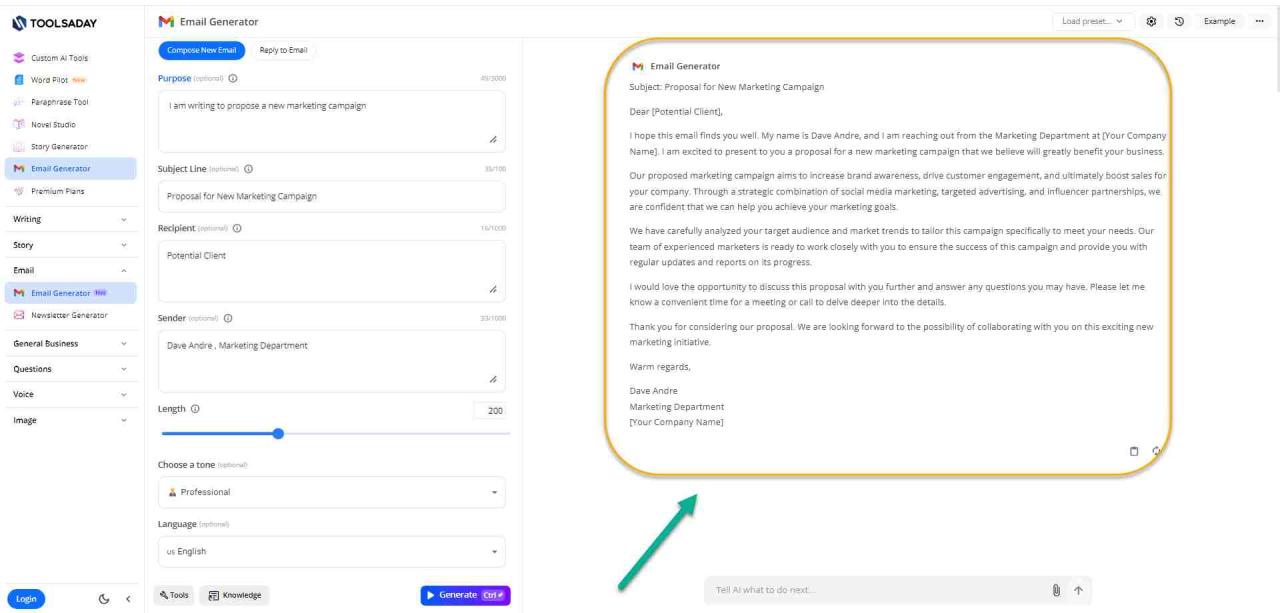
Professional emails are crucial for maintaining a positive image and fostering effective communication. Errors in grammar, tone, or formatting can significantly impact how your message is received and perceived. This section will highlight common pitfalls and provide actionable strategies to avoid them, ensuring your emails consistently reflect professionalism.Addressing these common mistakes proactively will help ensure your emails are well-received and maintain a professional image.
A meticulous approach to email etiquette can enhance your communication effectiveness, building strong relationships and fostering a positive impression.
Grammatical Errors
Grammatical errors, while seemingly minor, can significantly detract from the professionalism of an email. Errors in sentence structure, verb tense, and subject-verb agreement can make the message appear careless and unprofessional. Thorough proofreading is essential for maintaining a polished and professional communication style.
- Incorrect verb tense:
- Faulty sentence structure:
- Subject-verb agreement issues:
Tone and Style Issues
Maintaining a suitable tone and style is critical for professional communication. A tone that is too casual, overly formal, or even aggressive can damage relationships and hinder effective communication. Understanding the appropriate tone for different recipients and situations is key.
- Informal language:
- Aggressive or confrontational language:
- Lack of clarity or vagueness:
Formatting and Organization
Effective formatting enhances readability and professionalism. Clear formatting makes it easier for the recipient to understand the message and extract key information.
- Poorly formatted paragraphs:
- Lack of headings and subheadings (where appropriate):
- Inappropriate use of emojis or slang:
Email Content Issues
The content of an email must be clear, concise, and focused on the purpose of the message.
- Unclear or ambiguous requests:
- Incomplete or missing information:
- Lack of a clear call to action (where needed):
Using the Wrong Email Type
Using the incorrect email type (e.g., a formal email for an informal announcement) can negatively impact the recipient’s perception of your professionalism.
- Using a formal email for a casual matter:
- Using an informal email for a critical or formal subject:
Addressing Common Email Mistakes (Table Summary)
| Category | Mistake | Example | Solution |
|---|---|---|---|
| Grammar | Incorrect verb tense | “I went to the store yesterday.” (incorrect past tense) | “I went to the store yesterday.” (correct past tense) |
| Tone | Informal language | Using slang or abbreviations | Employ formal and professional language |
| Formatting | Lack of headings | A long paragraph with no headings | Use clear headings and subheadings |
| Content | Unclear requests | “Could you help me?” | “Please provide the report by Friday.” |
Proofreading & Editing
A professional email reflects the sender’s competence and credibility. Careful proofreading and editing are crucial steps in ensuring your message is not only well-received but also effectively conveys your intended meaning. A single typo or grammatical error can undermine your professionalism and damage your reputation.Thorough review is essential to eliminate any potential misunderstandings or misinterpretations, and ensures that the message is polished and conveys the intended tone.
By meticulously reviewing your emails before sending, you enhance clarity, avoid costly mistakes, and maintain a high level of professionalism.
Importance of Proofreading
Proofreading is more than just catching typos; it’s about ensuring clarity, accuracy, and professionalism in your communication. An error-free email demonstrates attention to detail, which is a valuable asset in any professional context. This careful review process helps to ensure that your message is understood correctly and avoids any misinterpretations or confusion.
Strategies for Thorough Proofreading
Effective proofreading involves a multi-faceted approach. Utilizing various tools and techniques enhances the quality of your email. A combination of approaches increases the chances of identifying and correcting potential errors.
- Spell Check and Grammar Tools: Employ built-in spell check and grammar tools in your email client or word processor. These tools are invaluable for catching simple errors, but they are not infallible. Manual review is essential to catch more subtle errors.
- Read Aloud: Reading your email aloud helps you identify awkward phrasing, missing words, or misplaced punctuation. This method is particularly useful for recognizing subtle inconsistencies or errors that may be missed during silent reading.
- Print and Review: Printing a hard copy of your email can be surprisingly effective. The physical separation from the screen allows for a fresh perspective and a more focused review. This method can help you spot errors that might otherwise go unnoticed.
- Time Delay: Allowing some time between drafting and reviewing your email is highly beneficial. A break can refresh your perspective, helping you approach the review with a critical eye, rather than focusing on what you intended to say. This helps you to catch unintended errors that you might have overlooked in the heat of writing.
Ensuring Accuracy of Email Content
Accuracy is paramount in professional communication. Carefully verifying information, ensuring facts are correct, and double-checking figures before inclusion in an email is essential.
- Fact-Checking: If your email contains any factual information, verify its accuracy through reliable sources such as reputable websites, industry reports, or colleagues with relevant expertise. Confirming data accuracy prevents the spread of misinformation and enhances the credibility of your communication.
- Data Validation: When working with numerical data, ensure that the figures are correct and accurate. Using a spreadsheet or calculator can help to validate the data before including it in your email.
- Reviewing Attachments: Before sending emails with attachments, review the content of the attachments to ensure that they are accurate and relevant to the email’s purpose. This is particularly important to avoid sending incorrect or irrelevant information.
Checklist for Reviewing Emails
A structured checklist helps to ensure a thorough review. The checklist provides a framework for identifying and addressing potential issues.
| Review Point | Action |
|---|---|
| Spelling and Grammar | Use spell-check and grammar tools; read aloud; review multiple times |
| Accuracy of Information | Verify all facts, figures, and data; consult relevant sources |
| Clarity and Conciseness | Ensure the message is easy to understand; eliminate unnecessary jargon |
| Tone and Professionalism | Evaluate the email’s tone to ensure it is appropriate for the recipient and situation |
| Attachments (if any) | Verify the relevance and accuracy of attachments; check file names and sizes |
Last Point
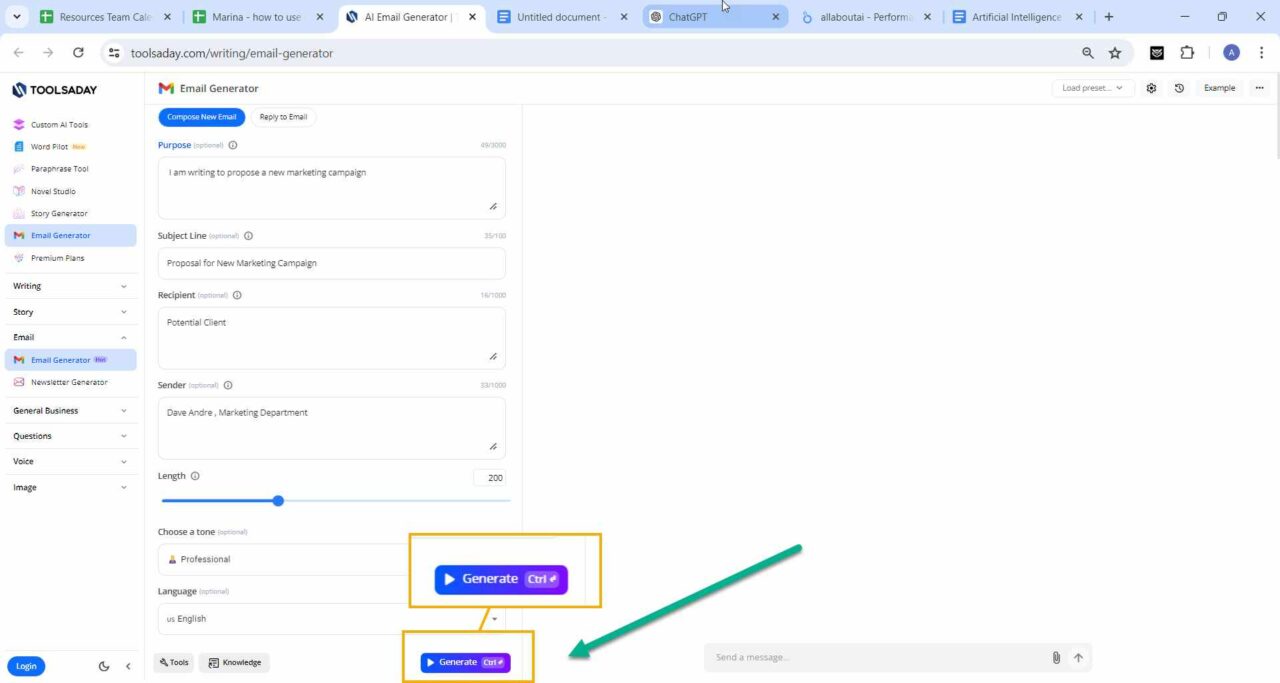
In summary, this guide has explored the key aspects of professional email writing, demonstrating how AI tools can streamline the process. By understanding email structure, tone, and best practices, you can craft impactful communications tailored to your needs. We’ve also highlighted the common pitfalls to avoid, ensuring your emails are both professional and effective.